
ScaleMap: Interactive Scale & Music Theory Tool
Explore scales, notes, scale degrees, chords and tonal relationships in one interactive tool. Use ScaleMap to connect music theory with practical musical structure.
Open ScaleMap →What Is ScaleMap?
ScaleMap is an interactive music theory tool that shows how scales, notes, scale degrees and chords relate to each other. It helps turn abstract scale theory into a clear visual structure.
Useful for: scale theory, chord construction, pentatonic patterns, modal understanding and seeing how notes function inside a key.
How to Use ScaleMap
Choose a root note and scale type, then use ScaleMap to explore how the notes, degrees, chords and tonal colors connect inside that scale.
Choose a Root Note
Select the key or root note you want to explore.
Select a Scale Type
Choose major, minor, harmonic minor, melodic minor or another available scale option.
View the Scale Notes
See which notes belong to the selected scale and how they relate to the root.
Check the Scale Degrees
Use the degree labels to understand the function of each note inside the scale.
Explore the Chords
View the diatonic chords built from the scale, including triads and 7th chords, and see how harmony connects to melody.
Choose Your Note Display
Switch between ABC and DoReMi notation and use sharps or flats to match the way you prefer to read note names.
Add Pentatonic and Blue Notes
Explore pentatonic material and blue-note options to see how additional tonal colors relate to the main scale.
Tip: choose one root and one scale at a time. Compare the notes, degrees and chords before moving on so you understand the structure instead of only memorizing names.
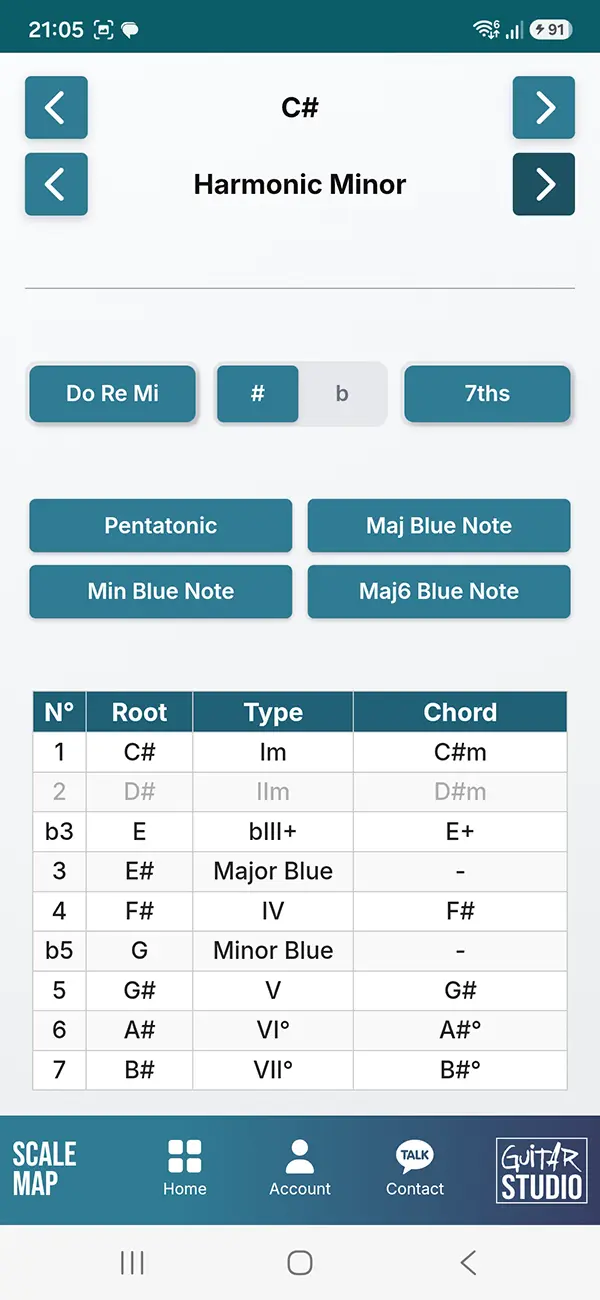
What ScaleMap Shows
ScaleMap brings several layers of music theory together in one place so you can see how notes, scale degrees and harmony connect inside a key or scale.
- Scale notes and the tones that belong to the selected scale
- Scale degrees and their function inside the tonal structure
- Diatonic chords, including triads and 7th chords built from the selected scale
- Pentatonic patterns and their relationship to the parent scale
- Blue notes and how they sit around pentatonic material
- Tonal relationships between notes, degrees and chords
- Note display options including ABC or DoReMi notation and sharps or flats
Scale Degrees and Chord Relationships
Scale degrees show the function of each note inside a key. In a major scale, those degrees can also be connected directly to the chords that are built from the scale.
In C major, for example, the progression is I – IIm – IIIm – IV – V – VIm – VII°, giving the chords C – Dm – Em – F – G – Am – B°.
Seeing notes, degrees and chords together makes it easier to understand why certain chords belong to a key, how chord progressions are constructed and how melodic notes relate to the harmony underneath them.
Want to see those scale relationships directly on the guitar neck? Explore them with FRETTR.
Pentatonic Scales and Blue Notes
Pentatonic scales simplify a larger tonal structure into five core notes. That makes them especially useful for guitarists, improvisers and anyone learning how melodic material fits over chords.
ScaleMap helps show how major and minor pentatonic material relates to the parent scale, so you can see which notes are shared and which tones are omitted.
It also helps place blue notes in context. Rather than treating them as isolated extra notes, you can see how they relate to the surrounding pentatonic and scale tones and how they add tension and color.
Common Scale Theory Mistakes
Memorizing notes without understanding their function. Knowing the notes of a scale is useful, but scale degrees show why those notes behave the way they do inside a key.
Learning scales separately from chords. Scales and chords are closely connected. Seeing both together makes it easier to understand harmony, chord progressions and melodic choices.
Treating pentatonic scales as isolated patterns. Major and minor pentatonic scales are part of a larger tonal structure. Understanding their relationship to the parent scale gives the patterns more musical meaning.
Ignoring chord quality. The degree alone is not the whole story. In a major key, for example, I, IV and V are major, IIm, IIIm and VIm are minor, and VII° is diminished.
Thinking only in one key. The note names change when you transpose, but the relationships between scale degrees and chord functions remain consistent.
ScaleMap FAQ
What is ScaleMap?
ScaleMap is an interactive music theory tool that helps you explore scales, notes, scale degrees, chords and tonal relationships in one place.
What can I learn with ScaleMap?
You can use ScaleMap to study scale structure, note functions, chord relationships, pentatonic material and how different tones relate inside a key.
Does ScaleMap show scale degrees and chords?
Yes. ScaleMap connects the notes of a scale with their scale degrees and the chords built from those notes.
Can ScaleMap help with pentatonic scales?
Yes. ScaleMap helps show how major and minor pentatonic material relates to the larger scale structure and surrounding tonal material.
What are blue notes?
Blue notes are tones used to add tension and color around pentatonic and blues-based material. ScaleMap helps place those notes in a wider tonal context.
Is ScaleMap useful for guitarists?
Yes. Guitarists can use ScaleMap to connect scale patterns with notes, degrees, chords and harmonic function instead of learning fretboard shapes in isolation.
Explore More Guitar Training Tools
Train timing, rhythm, ear, fretboard knowledge, tuning, pitch and music theory with the interactive tools from Guitar Training Studio.
Explore All Tools →Take Your Guitar Playing To The Next Level!

Wouter Baustein
Music Producer, Music & Mindset Coach
If you like clear, practical guitar and music coaching instead of random YouTube tips, you need structure. My guitar books and coaching programs give you that structure, so you can finally make real progress and level up your playing.