
FRETTR: Guitar Fretboard Scale & Mode Tool
Explore scales, modes, intervals and 3NPS patterns across a 24-fret guitar neck. Use FRETTR to connect scale structure with the actual fretboard.
Open FRETTR →What Is FRETTR?
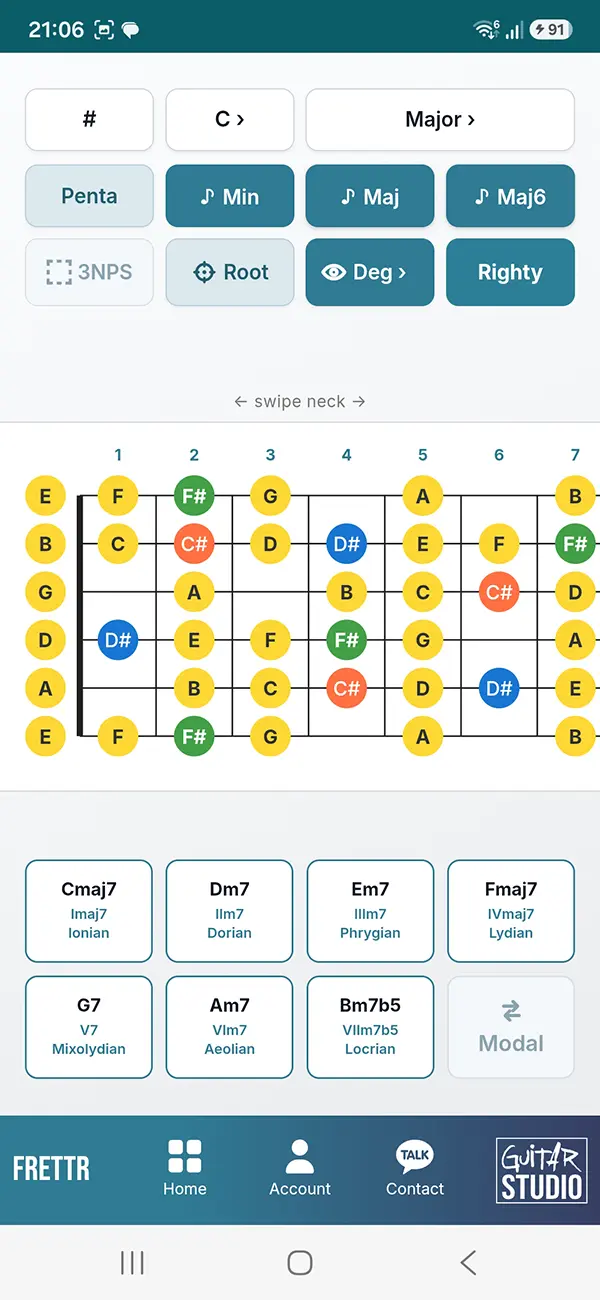
FRETTR is an interactive guitar fretboard tool for exploring scales, modes, intervals and 3NPS patterns across a 24-fret neck. It helps you connect music theory with the actual layout of the guitar.
Useful for: learning modes, finding roots, understanding interval structure and seeing scale patterns across the guitar neck.
How to Use FRETTR
Choose the key and scale system you want to study, then use FRETTR to explore modes, positions, roots, degrees, intervals and fretboard layouts in a way that matches how you want to practice.
Choose the Key
Select the root note or key you want to explore on the guitar neck.
Choose the Scale Type
Select major, minor, harmonic minor or melodic minor to explore different scale and mode systems.
Select a Mode
Choose the mode or position you want to study inside the selected scale system.
Choose Modal or Relative View
Switch between modal order and relative order to compare how the same scale system can be viewed from different tonal centers.
Choose Standard or 3NPS
Study ordinary mode shapes or switch to three-notes-per-string patterns for a more position-based fretboard view.
Show Notes, Degrees or Intervals
Change the fretboard labels depending on whether you want to focus on pitch names, scale-degree function or interval structure.
Show or Hide Roots
Highlight root notes for orientation, or hide them when you want to test your fretboard awareness from memory.
Switch Righty or Lefty
Mirror the neck orientation so the fretboard matches the way a right-handed or left-handed player sees the instrument.
Choose Flats or Sharps
Use the ♭ / ♯ option to display enharmonic note names in the spelling that fits the key or musical context.
Tip: start with roots and labels visible, then gradually remove visual information so you move from reading the fretboard toward actually knowing it.
What FRETTR Shows
FRETTR brings scale structure and fretboard layout together so you can study notes, roots, degrees, intervals, modes and positions directly on the guitar neck.
- Major, minor, harmonic minor and melodic minor scale systems
- Modes and positions inside the selected scale system
- Modal and relative views for comparing different tonal perspectives
- Standard shapes and 3NPS patterns for different ways of organizing scales across the fretboard
- Note names, scale degrees and intervals for studying both pitch and musical function
- Root-note highlighting for keeping track of the tonal center
- Right-handed and left-handed views so the neck orientation matches the player
- Flat and sharp notation for choosing the note spelling that fits the key or context
- 24-fret overview for seeing how scale structures continue across the neck
Modes and Relative Relationships
FRETTR lets you explore modes and positions within major, minor, harmonic minor and melodic minor scale systems.
In modal view, the selected mode is treated from its own tonal center. This makes it easier to study its root, degrees, interval structure and fretboard shape as a complete musical sound.
In relative view, you can see how modes belong to the same parent scale system. The available notes may remain the same while the tonal center and musical function change.
Comparing both views helps you understand modes as connected structures rather than isolated fretboard patterns, and makes it easier to relate scale shapes to roots, degrees and harmony.
Want to explore those scale relationships from a broader theory perspective? Use ScaleMap to compare scales, degrees and harmonic relationships.
3NPS Patterns
3NPS means three notes per string. It is a common way to organize scales across the guitar neck and can make longer scale runs feel more consistent under the fingers.
FRETTR lets you switch 3NPS patterns on or off so you can compare a structured fingering approach with the broader scale layout across the fretboard.
This is especially useful when practicing position shifts, connecting scale shapes and developing a clearer view of how one scale continues horizontally across the neck.
Notes, Intervals and Root Awareness
FRETTR lets you change how much information is shown on the fretboard. You can work with note names, intervals or remove the labels entirely.
Note names help with fretboard knowledge, while interval labels make it easier to see the structure of a scale relative to its root. Hiding the labels turns the same view into a stronger recall exercise.
You can also show or hide the root notes. Keeping the roots visible gives you a clear tonal reference; hiding them forces you to locate the tonal center from memory.
Switching between these views helps move from simple visual recognition toward a more complete understanding of how notes and intervals are organized across the guitar neck.
Common Fretboard Learning Mistakes
Memorizing shapes without knowing the notes. Patterns are useful, but if you only learn fingerings, it is harder to understand what you are actually playing or move the same idea to another key.
Ignoring interval structure. Notes tell you where you are, but intervals explain how each note relates to the root and why a scale or mode has its particular sound.
Practicing only one position. Staying inside one box can make the fretboard feel fragmented. Explore the same scale across the neck so different positions start to connect.
Treating modes as completely separate patterns. Modes are easier to understand when you also see their relative relationships and how changing the tonal center changes the function of the same notes.
Keeping every label visible all the time. Visual references are useful at first, but gradually hiding notes, intervals or roots turns the fretboard into a recall exercise instead of a reading exercise.
FRETTR FAQ
What is FRETTR?
FRETTR is an interactive guitar fretboard tool for exploring scales, modes, roots, scale degrees, intervals and fretboard positions.
Which scale systems can I explore with FRETTR?
FRETTR includes major, minor, harmonic minor and melodic minor scale systems, with modes and positions available inside those structures.
Can FRETTR show scale degrees instead of note names?
Yes. You can use scale-degree and interval views to focus on musical function instead of only memorizing note names.
Does FRETTR include 3NPS patterns?
Yes. FRETTR includes three-notes-per-string views as well as standard scale and mode shapes.
Does FRETTR work for left-handed guitarists?
Yes. FRETTR includes Righty and Lefty views so the fretboard orientation can match the way you see your guitar.
What is the difference between modal and relative view?
Modal view focuses on the selected mode from its own tonal center, while relative view shows how modes connect inside the same parent scale system.
Explore More Guitar Training Tools
Train timing, rhythm, ear, fretboard knowledge, tuning, pitch and music theory with the interactive tools from Guitar Training Studio.
Explore All Tools →Take Your Guitar Playing To The Next Level!

Wouter Baustein
Music Producer, Music & Mindset Coach
If you like clear, practical guitar and music coaching instead of random YouTube tips, you need structure. My guitar books and coaching programs give you that structure, so you can finally make real progress and level up your playing.