
PITCHR: Chromatic Guitar Tuner & Pitch Detector
Tune guitar, bass or any chromatic note with real-time pitch detection. Adjust the reference pitch and use reference tones for accurate, flexible tuning and pitch work.
Open PITCHR →What Is PITCHR?
PITCHR is an online chromatic tuner and pitch detector for guitar, bass and other instruments. It listens to your input, detects the pitch in real time and helps you tune accurately around a chosen reference pitch.
Useful for: chromatic tuning, guitar and bass tuning, alternate reference pitch, pitch checking and ear-based tuning with reference tones.
How to Use PITCHR
Choose the tuning mode and setup you need, allow microphone access and use PITCHR's visual tuner to bring each note accurately into tune.
Choose Chromatic, Guitar or Bass
Use chromatic mode for any pitch, guitar mode for guitar-specific setups or bass mode for lower instrument ranges.
Choose 6, 7 or 8 Strings
In guitar mode, select the instrument range that matches your 6-string, 7-string or 8-string guitar.
Select a Tuning
Choose from standard tuning, lower standard tunings, drop tunings, open tunings and other available guitar setups.
Allow Microphone Access
PITCHR uses your microphone input to detect the pitch of the note you are playing in real time.
Play One Clear Note
Play one string or note at a time and let it ring clearly. Muting the other strings helps produce a more stable reading.
Aim for the Green Center
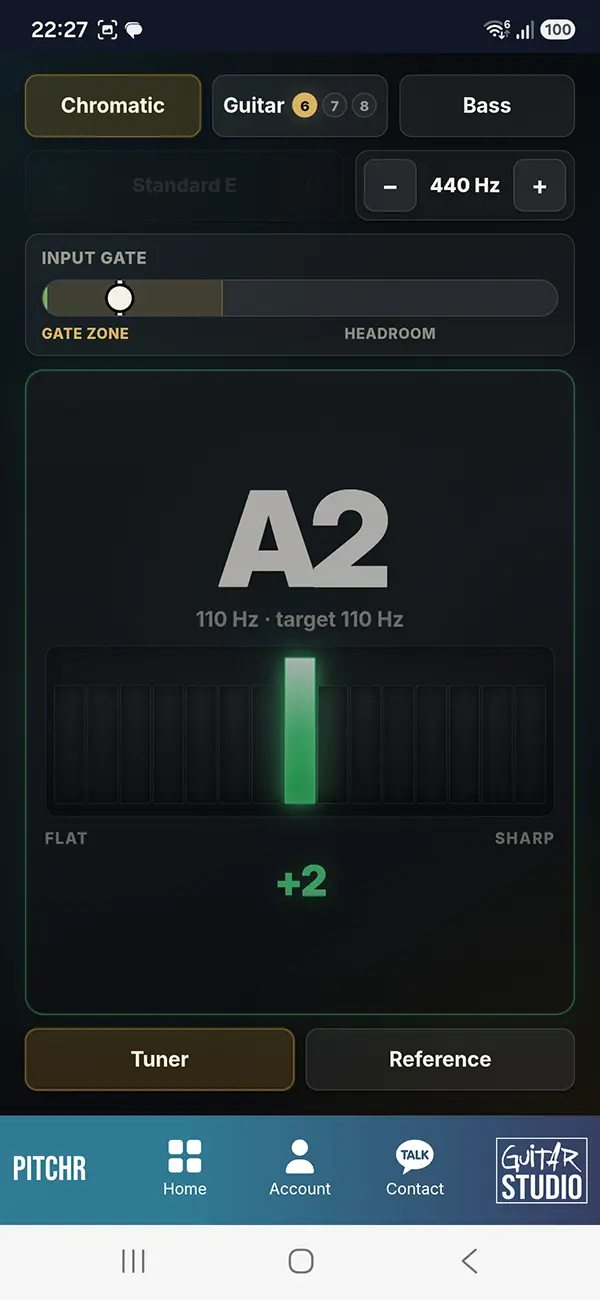
The large note display shows the detected pitch. Use the LED-style meter to see whether the note is flat or sharp and tune toward the green center.
Adjust the Input Gate
Raise the gate when background noise causes false detection, or lower it when your input signal is too quiet. The gate and headroom display help you judge whether the signal is strong enough.
Set the Reference Pitch
Adjust A4 from 410 to 450 Hz when you need to tune to a pitch standard other than the usual 440 Hz.
Use Reference Tones
Play an audible reference tone when you want to tune by ear, compare pitches or practice matching a note without relying only on the visual tuner.
Tip: low guitar and bass reference tones may sound weak on small phone speakers. Headphones, external speakers or monitors usually give a clearer audible reference.
What PITCHR Does
PITCHR combines real-time pitch detection with practical guitar, bass and chromatic tuning controls, making it useful for both standard setups and more flexible tuning situations.
- Chromatic pitch detection for tuning any note freely
- Guitar mode with support for 6-string, 7-string and 8-string guitar setups
- Guitar tuning presets including standard, lower standard, drop and open tunings
- Bass mode for lower instrument ranges
- Large detected-note display for clear pitch identification
- LED-style tuning meter showing whether the note is flat, sharp or centered in tune
- Adjustable A4 reference pitch for standard or alternate pitch standards
- Input gate control to reduce unwanted background-noise detection
- Gate and headroom display to help judge whether the input signal is strong enough for stable pitch detection
- Built-in reference tones for tuning by ear, pitch matching and audible reference
Reference Pitch: 440 Hz, 432 Hz and Beyond
Most modern tuning uses A4 = 440 Hz as the reference pitch. PITCHR lets you change that reference when you need to match a different tuning standard, recording, instrument or ensemble.
You can adjust A4 from 410 Hz to 450 Hz, which includes commonly used alternatives such as 432 Hz and 445 Hz as well as custom values in between.
Changing the reference pitch does not change the note names. It changes the frequency that each note is tuned around, so every pitch shifts slightly higher or lower together.
Want to see the exact frequency of any musical note at different reference pitches? Use Note / Freq.
This is useful when tuning to recordings, matching other instruments or working in situations where standard 440 Hz is not the chosen reference.
Chromatic vs Guitar vs Bass Tuning
Chromatic mode detects any musical pitch instead of only the standard open strings of one instrument. This makes it useful for alternate tunings, capo positions, slide guitar, other instruments and general pitch checking.
Guitar mode adds instrument-specific options for 6-string, 7-string and 8-string guitars. You can select practical tuning presets including standard, lower standard, drop and open tunings instead of tuning every target note manually.
Bass mode provides a focused setup for lower instrument ranges. Very low notes can be more difficult for browser tuners and small device microphones to detect, so a clean signal and a sustained note help produce a more stable reading.
Use Guitar or Bass mode when you want instrument-specific guidance and presets. Use Chromatic mode when you want the most flexible pitch detection.
Common Tuning Mistakes
Playing the note too hard. A strong attack can make the pitch jump sharp for a moment. Play the note cleanly and let it settle before making the final adjustment.
Tuning in a noisy room. Background sound can interfere with pitch detection. Move closer to the microphone and reduce other sound sources when possible.
Letting other strings ring. Sympathetic vibration can confuse the tuner. Mute unused strings and play one note at a time.
Using the wrong reference pitch. If the music or ensemble is not using A4 = 440 Hz, your instrument can be internally in tune but still sound out of tune with everything else.
Checking only once. Changing the tension of one string can slightly affect the others. After tuning all strings, check them again and make small corrections.
PITCHR FAQ
What is PITCHR?
PITCHR is an online chromatic tuner and pitch detector for guitar, bass and other instruments, with tuning presets, adjustable reference pitch and built-in reference tones.
Does PITCHR support 6-string, 7-string and 8-string guitars?
Yes. Guitar mode includes setups for 6-string, 7-string and 8-string guitars.
Does PITCHR support alternate guitar tunings?
Yes. PITCHR includes practical presets for standard tuning, lower standard tunings, drop tunings, open tunings and other guitar setups.
What does the input gate do?
The input gate helps ignore background noise and weak unwanted signals. Raising the gate can reduce false detection in a noisy room, while lowering it can help when the instrument signal is quiet.
Can I change the reference pitch from 440 Hz?
Yes. PITCHR lets you adjust the A4 reference when you need to match a different pitch standard instead of the usual 440 Hz.
Can I use PITCHR as a chromatic tuner?
Yes. Chromatic mode detects any musical pitch rather than only the standard open strings of guitar or bass.
Explore More Guitar Training Tools
Train timing, rhythm, ear, fretboard knowledge, tuning, pitch and music theory with the interactive tools from Guitar Training Studio.
Explore All Tools →
Guitar Training Studio
Ready to Make Real Progress on Guitar?
Build better technique, timing and musicianship with structured guitar training, practical tools and personal coaching.