
Pitch & Frequency Tool
Note / Freq: Note Frequency Calculator
Convert musical notes to frequencies, convert frequencies back to notes, compare tuning references and explore pitch values across multiple octaves.
Open Note / Freq →Musical Note Frequencies in Hz
Musical notes correspond to specific frequencies measured in Hertz (Hz). In standard concert pitch, A4 = 440 Hz. Use the calculator below to convert any musical note to frequency, or any frequency in Hz to the nearest note.
Tip: every octave doubles the frequency. For example, A4 is 440 Hz and A5 is 880 Hz.
How to Use the Note Frequency Calculator
Note / Freq works in both directions: choose a musical note to find its frequency in Hertz, or enter a frequency to find the nearest musical note. You can also change the reference tuning to compare different pitch systems.
Choose a note
Select the note name and octave you want to calculate.
Choose the reference pitch
Use standard A4 = 440 Hz or select another reference tuning.
Read the frequency
The calculator instantly shows the corresponding frequency in Hertz.
Enter a frequency
Type the frequency in Hertz that you want to identify.
Check the nearest note
Note / Freq shows the closest musical note and octave for that frequency.
Compare tuning references
Change the A4 reference to see how the same note shifts under a different tuning.
Standard modern concert pitch uses A4 = 440 Hz, but Note / Freq can also be used to explore alternative reference pitches such as 432 Hz, 415 Hz, 528 Hz or a custom A4 value.
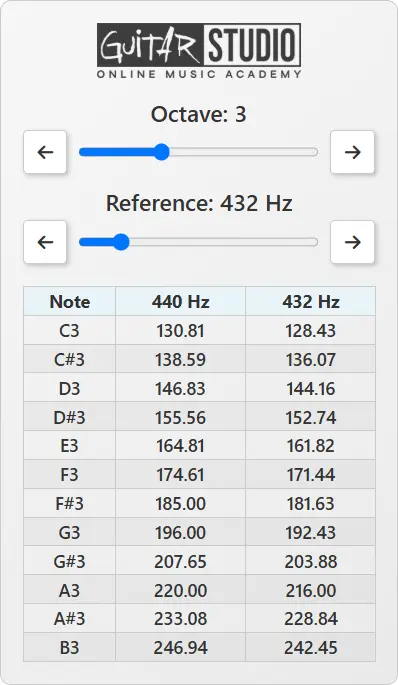
What Note / Freq Does
Note / Freq connects musical note names with their actual frequencies in Hertz. Choose a note to calculate its frequency, enter a frequency to identify the nearest note, or change the reference pitch to compare different tuning systems. It is useful anywhere musical pitch needs to be translated into an exact frequency value.
Guitarists & Bass Players
Check open-string frequencies, alternate tunings, harmonics, octave relationships and pitch-based effects.
Producers & Sound Designers
Work with synth oscillators, sample tuning, pitch correction, tone generation and frequency-based sound design.
Students & Teachers
Understand and explain the relationship between notes, octaves, Hertz and reference tuning.
Musicians & Engineers
Compare tuning references and use precise pitch values during recording, analysis and technical audio work.
How Musical Note Frequencies Are Calculated
Musical note frequencies are calculated from a reference pitch. In modern Western music, that reference is usually A4 = 440 Hz. In twelve-tone equal temperament, every semitone is separated by the same frequency ratio: the twelfth root of 2.
Frequency = Reference Frequency × 2(n/12)
n is the number of semitones above or below the reference note. Notes below the reference use a negative value.
A#4 — One Semitone Higher
A#4 is one semitone above A4.
440 × 2(1/12) = 466.16 Hz
B4 — Two Semitones Higher
B4 is two semitones above A4.
440 × 2(2/12) = 493.88 Hz
A5 — One Octave Higher
Twelve semitones equal one octave, so the frequency doubles.
440 × 2(12/12) = 880 Hz
You do not need to calculate these values manually every time. Note / Freq does it instantly, but understanding the formula explains why octaves double in frequency and why changing the reference tuning changes the frequency of every note.
Standard 440 Hz Note Frequency Table
The calculator is the fastest way to find exact note frequencies, especially when working with alternative reference pitches such as 432 Hz, 415 Hz, 528 Hz or a custom tuning. The table below provides a quick reference for standard A4 = 440 Hz tuning.
Notes on the guitar and bass fretboard + frequencies (Hz)
Note: the frequency (Hz) values are rounded without decimals for space-saving purposes.
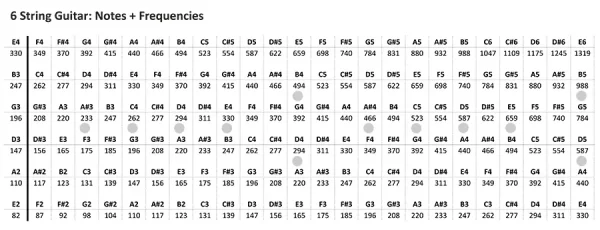
(download members only)
Notes on the guitar fretboard (with sharps # and flats b)
Note: a C# and Db is in our Western music exact the same note (enharmonic). BUT, in music theory a C# is not the same as a Db!
(download members only)
Want to explore those notes across the full guitar neck? Use FRETTR to visualize notes, roots, intervals, scales and modes directly on the fretboard.
Standard 440 Hz and Alternative Reference Tunings
Standard 440 Hz Tuning
In modern Western music, A4 is commonly tuned to 440 Hz. This is the reference value used by many tuners, instruments, DAWs and music production tools.
When A4 is set to 440 Hz, the calculator can derive the frequencies of other notes across the octave range. This gives you a practical reference for tuning, production and music education.
Want to check a pitch in real time through your microphone? Use PITCHR, the online chromatic tuner and pitch detector.
Alternative Reference Tunings
Some musicians and producers experiment with alternative reference tunings such as 432 Hz, 415 Hz or 528 Hz. These tunings shift the frequency of every note compared to standard 440 Hz.
Note / Freq lets you compare those values quickly. This can be useful for historical tuning experiments, sound design, creative production, instrument setup or simply understanding how reference tuning affects note frequencies.
Sharps, Flats, and Enharmonic Notes
Some notes have two common names. For example, C# and Db can refer to the same pitch in equal temperament. These are called enharmonic equivalents.
On guitar, piano, bass, MIDI keyboard, and most modern production tools, C# and Db usually produce the same frequency. The same applies to D# / Eb, F# / Gb, G# / Ab, and A# / Bb.
In music theory, however, the correct note name depends on the musical context. C# and Db may sound the same in equal temperament, but they do not always mean the same thing inside a key, scale, chord, or written score.
Practical Uses & Common Mistakes
Practical Uses for Note / Freq
You can use Note / Freq in many practical situations.
Guitarists can use it to check note frequencies, open string values, octave relationships, alternate tunings and pitch effects. Producers can use it for synth oscillators, sample tuning, pitch correction, sound design and frequency references. Teachers can use it to explain the connection between notes and hertz.
It can also help when comparing charts, tuning systems, instrument ranges and audio tools that use frequency values instead of note names.
Common Mistakes With Note Frequencies
The frequency depends on the reference tuning. A4 at 440 Hz and A4 at 432 Hz create different frequency values for every note.
A note frequency tells you the fundamental pitch. An EQ frequency can include harmonics, overtones, resonance, noise and timbral content around the sound.
They can sound and feel different, but the useful part of a calculator is that it shows exactly how the numbers change.
Note Frequency Calculator FAQ
What frequency is A4?
In standard modern concert pitch, A4 is commonly tuned to 440 Hz. If the reference tuning changes, the frequency of A4 and every other note changes with it.
What frequency is middle C?
With A4 set to 440 Hz, middle C — C4 — has a frequency of approximately 261.63 Hz.
Why does frequency double every octave?
Moving up twelve semitones in equal temperament doubles the frequency. For example, A4 is 440 Hz and A5 is 880 Hz.
Can I use a reference pitch other than 440 Hz?
Yes. Note / Freq can compare alternative reference pitches such as 432 Hz, 415 Hz, 528 Hz or a custom A4 value.
Are C# and Db the same frequency?
In twelve-tone equal temperament, C# and Db normally have the same frequency. They are enharmonic equivalents, although the correct note name depends on the musical context.
Is note frequency the same as EQ frequency?
No. A note frequency describes the fundamental pitch. An EQ frequency can also relate to harmonics, overtones, resonance, noise and other parts of the sound spectrum.
Explore More Guitar Training Tools
Train timing, rhythm, ear, fretboard knowledge, tuning, pitch and practical music theory with the Guitar Training Studio tools.

Guitar Training Studio
Ready to Make Real Progress on Guitar?
Build better technique, timing and musicianship with structured guitar training, practical tools and personal coaching.