
Smart Click: Online Metronome for Musicians
Practice timing, tempo control, subdivisions, swing and shuffle with a flexible metronome built for real musical practice.
Open Smart Click →What Does an Online Metronome Do?
An online metronome plays a steady pulse at a tempo you choose in beats per minute (BPM). Use it to practice staying in time, control your tempo and develop a more consistent internal sense of rhythm.
Practice tip: start at a tempo where you can play cleanly and consistently, then increase the BPM gradually instead of immediately practicing at full speed.
How to Use Smart Click
Set a tempo, choose the rhythmic feel you want to practice and play along with the click. Smart Click is designed to help you work on timing, subdivisions and tempo control without unnecessary setup.
Choose Your BPM
Set the tempo to a speed where you can play comfortably and cleanly. Lower the BPM if the exercise starts to feel rushed or inconsistent. Not sure what tempo to use? Find the BPM of a song, riff or groove first with Tap Tempo, then set Smart Click to the same tempo.
Select the Subdivision
Practice with quarter notes, eighth notes, sixteenth notes or other available subdivisions depending on the rhythm you want to train.
Choose the Feel
Use straight timing for even subdivisions, or switch to swing or shuffle when the exercise needs a triplet-based feel.
Play With the Click
Listen for the pulse and keep your notes, chords or rhythm patterns locked to it instead of simply trying to play faster.
Increase the Tempo Gradually
Once you can repeat the exercise cleanly and consistently, raise the BPM in small steps and repeat the same process. Want to compare playing speeds across different rhythmic subdivisions? Use the Notes Per Second Calculator to convert BPM and note value into NPS.
What Smart Click Helps You Practice
Smart Click is more than a basic tempo reference. It gives you a steady rhythmic framework for practicing timing, subdivisions and different musical feels at a controlled BPM.
Use it for scales, chords, picking exercises, riffs, strumming patterns, rhythm reading, improvisation or complete songs whenever you want a clear and repeatable timing reference.
Prefer practicing with a groove instead of a click? Try GROOVR and play along with interactive drum patterns.
- Timing: keep notes and rhythms aligned with a steady pulse.
- Tempo control: practice at a specific BPM and increase speed gradually.
- Subdivisions: work with quarter notes, eighth notes, sixteenth notes and other rhythmic divisions.
- Swing and shuffle: practice rhythms that do not use evenly spaced straight subdivisions.
- Consistency: repeat the same exercise under identical timing conditions.
- Speed training: measure progress without sacrificing rhythmic accuracy.
How to Practice With a Metronome Effectively
Start slower than you think you need to. Choose a BPM where you can play the exercise cleanly, stay relaxed and hear exactly where your notes fall in relation to the click.
Listen as much as you play. The goal is not to chase the metronome. Try to place your notes together with the pulse and notice when you move ahead of or behind it.
Increase the BPM in small steps. Once the exercise feels controlled, raise the tempo gradually. Small increases make it easier to identify the point where timing or technique begins to break down.
Practice different subdivisions. Quarter notes, eighth notes, sixteenth notes, triplets, swing and shuffle each require a different relationship to the pulse. Changing subdivisions helps develop stronger rhythmic awareness.
Do not use speed as the only measure of progress. Good metronome practice improves consistency, control and musical timing. A clean performance at a lower BPM is more valuable than a faster one that drifts away from the beat.
Straight, Swing and Shuffle Timing
Straight timing divides the beat into equal parts. Straight eighth notes, for example, place two evenly spaced notes inside each beat. This is common in rock, pop, funk, metal and many other styles.
Swing timing changes that spacing so the first part of the beat lasts longer than the second. The result feels less even and creates the characteristic forward-moving swing feel heard in jazz, blues and many groove-based styles.
Shuffle timing is closely related to a triplet feel. Instead of playing two equal eighth notes, the rhythm is often felt as the first and third notes of an eighth-note triplet.
Practicing the same riff, scale or chord pattern with straight, swing and shuffle timing is a useful way to hear how rhythmic feel can change even when the BPM stays exactly the same.
Common Metronome Practice Mistakes
Starting too fast. If you cannot play the exercise cleanly and consistently, lower the BPM. The metronome should help you control the music, not force you to rush.
Following the click instead of locking in with it. Try to place your notes directly on the pulse instead of constantly reacting after you hear each click.
Increasing the tempo before the exercise is stable. Stay at the same BPM until you can repeat the passage reliably. Speed built on inconsistent timing usually creates more problems later.
Ignoring subdivisions. A steady quarter-note click does not automatically mean your eighth notes, sixteenth notes or triplets are even. Listen to how every note sits between the beats.
Only practicing with a dense click. Once your timing becomes more secure, using fewer reference clicks can make you responsible for more of the pulse yourself and expose timing drift more clearly.
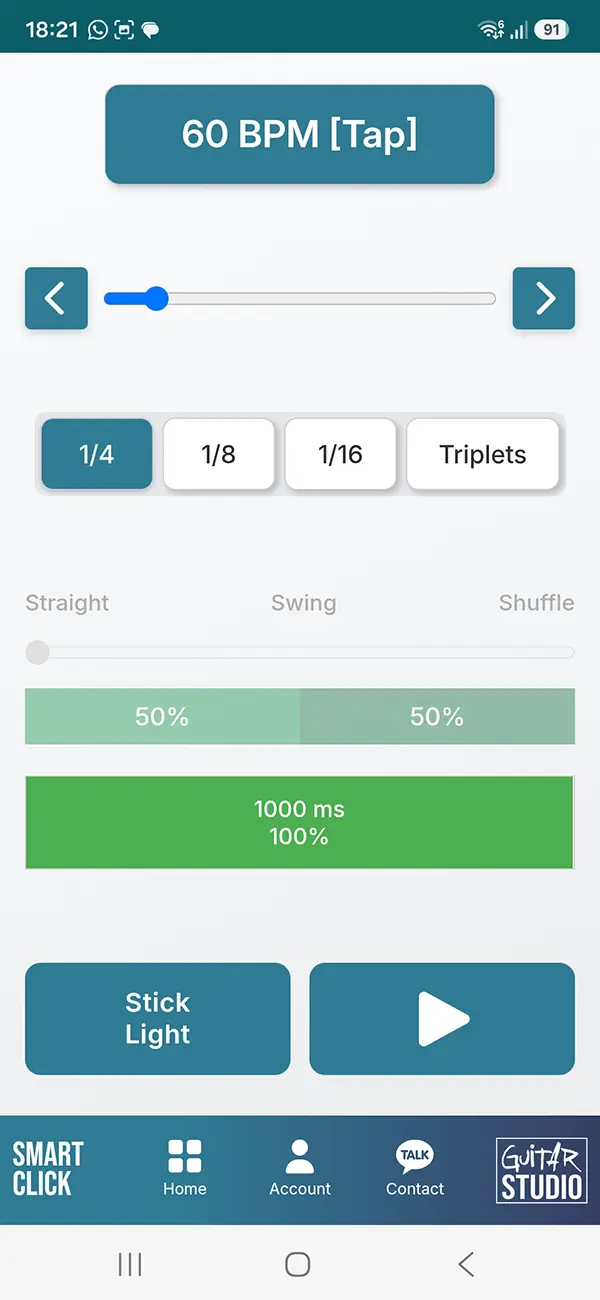
Smart Click inside the Guitar Training Studio app
Smart Click for Effects and Recording
Smart Click is also useful when working with pedals, loopers, backing tracks, DAWs and other tempo-based tools. A clear BPM reference makes it easier to keep recordings, loops and rhythmic effects synchronized.
Delay repeats, rhythmic echoes, modulation and other synced effects often depend on exact tempo values. Once you know the BPM, you can use it as a reference before recording, looping or programming parts.
For exact delay times in milliseconds, use the BPM to MS Calculator .
Online Metronome FAQ
What is an online metronome?
An online metronome produces a steady pulse at a tempo you choose in beats per minute (BPM). It helps musicians practice timing, rhythm and tempo control.
What BPM should I practice at?
Start at a BPM where you can play the exercise cleanly and consistently. Increase the tempo gradually once your timing and technique remain controlled.
How should I practice guitar with a metronome?
Choose a comfortable tempo, play along with the click and listen carefully to where your notes fall relative to the beat. Raise the BPM only when you can repeat the exercise reliably.
What are metronome subdivisions?
Subdivisions divide each beat into smaller rhythmic units such as eighth notes, sixteenth notes or triplets. Practicing subdivisions helps improve rhythmic accuracy between the main beats.
What is the difference between straight, swing and shuffle?
Straight subdivisions are evenly spaced. Swing changes the spacing between notes, while shuffle is commonly based on a triplet feel using the first and third parts of the triplet.
Does practicing with a metronome improve timing?
A metronome gives you a consistent external pulse against which you can hear timing drift. Regular practice can help you develop steadier rhythm, stronger tempo awareness and better control.
Explore More Guitar Training Tools
Train timing, rhythm, ear, fretboard knowledge, tuning, pitch and music theory with the interactive tools from Guitar Training Studio.
Explore All Tools →
Guitar Training Studio
Ready to Make Real Progress on Guitar?
Build better technique, timing and musicianship with structured guitar training, practical tools and personal coaching.